Shades vs Angels


 Arts
Arts Down
DownAugust 25, 2013, 01:57:38 AM
Angels vs Demons??? NO!!! Angels vs Darkness!!!I am making two commander decks on magic set editor, making my own cards. In making these, I've decided to make two commander decks to duke it out with each other. I need some help with card design on the commanders themselves. I need to know if they are overpowered.
Shade deck:
Shinza, Shadow of the World


Legendary Creature - Human Shade Mythic Rare
Shade creatures you control gain +X/+X, X being the power of this card.
: This creature gains +1/+1 until the end of the turn.[1/1]
Now... I this this card is bland. I want it to be more. I was pondering the idea to give it a +1/+1 counter for
instead. But it didn't fit the flavor. Suggestions.Two things,
1.Human Shade because... I'll figure out how to post the art later, because I don't know how to...
2.I can't say the name on the first ability because saying Shadow, puts in reminder text automatically... So, help me...
 Like
Like
 Ban
Ban
 Quote
Quote
 Report
August 25, 2013, 11:55:26 AM
I would either boost it to or put a cap on it like "you can only activate this ability three times a turn."August 25, 2013, 01:14:58 PM
I would either boost it to
On which ability, counter or the one on the card now?
August 25, 2013, 03:01:33 PM
I would either boost it toOn which ability, counter or the one on the card now?
One on the card now. If you didn't if would make it overpowered, especially if you had a a lot of shades out. Although if you want to make it fit the flavor of a shade better, you do something like "
: Destroy target non-black creature, put a +1/+1 counter on Shinza, Shadow of the World"August 25, 2013, 03:07:31 PM
With your other two problems:1) find the image online and post it like this: (quote me to see how)
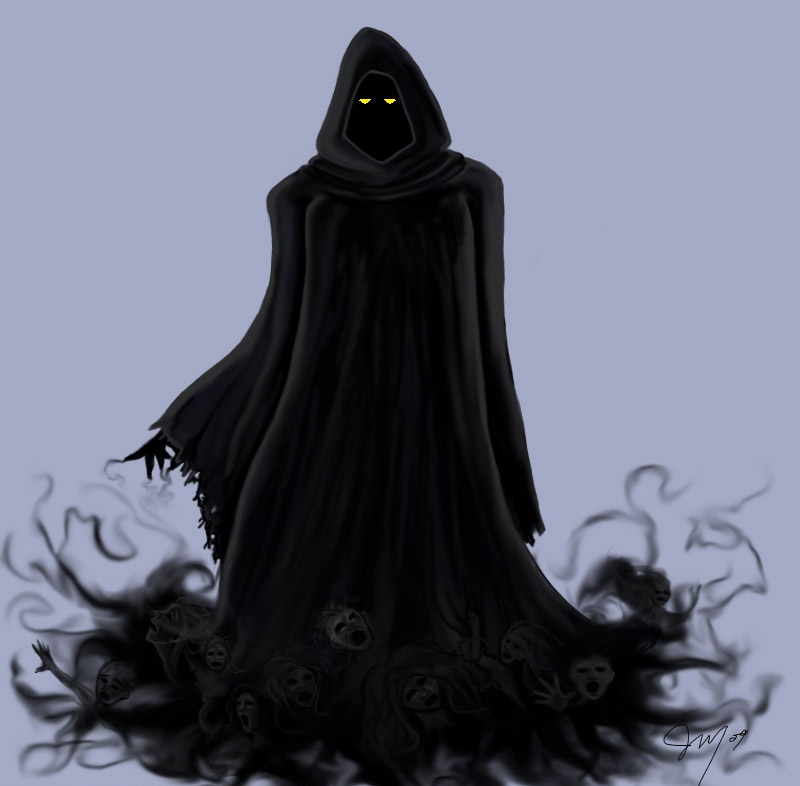
2) That would depend on what you are using to make the cards...I prefer Magic Set Editor
You said you are having problems with your commanders. Could you post the Angel?
August 25, 2013, 08:37:00 PM
Currently only working on shade deck. I wanna keep focused on one thing. I think I'll keep my commander art, I do like the ends of the cloak though, so I'll probably use that. Thanks for the input on the ability. I put it at three, should I bump it up to four.I also made a nice shade, and a common enchantment.
Shade cost
 and its +1/+0 ability costs .
It is still a black creature though, thoughts.
The enchantment is an aura cost
and it says that the enchanted creature gains +1/+1. And at the end of the end step, put it on a creature target opponent controls. The other enchantment is called nightfall and it cost
and makes shades cost less.August 25, 2013, 10:35:43 PM
how do you post a file, i would post some of this stuff but i dont know how.by the way, went to print preview, and the cards just looked screwey unlike in the set editor itself.
i do like magic set editor 2 btw

October 30, 2013, 02:36:01 PM
Ok I love this already, are you still working on this because I'd LOVE to help.October 30, 2013, 04:23:59 PM
As for your problem with Shadow showing up in italics, or even showing the rules text, do this:Type in Shadow on the card, once the rules text pops up, right click the rules text and uncheck the line that says reminder text.
If you anticipate that you'll be typing Shadow in this set a lot, you can even force it to never show up again. If you want to go this route, do this:
1. Go to the Set Info tab, and under the Automatic reminder text, uncheck the box titled "Old".
2. Go to the Keywords tab, look at your toolbar, you should see a search box that will say "Search for keywords" faded out in italics. Next to that box you will see 2 icons that have keys, one will have a green +, and the other, a red x. Click on the green one.
3. By clicking that button you'll have created a new Keyword, but what you're really going to do is simply re-create the Keyword Shadow. Set it up like this:
Keyword: Shadow
Mode: Old
Matches: Shadow
Reminder text: This creature can block or be blocked by only creatures with shadow.
If you typed it in exactly like that, you'll have created a new Shadow that will take precedence over the old one, and by making its mode Old, and unchecking the box titled Old under Set Info, you'll make the reminder text never pop up again.
This method works with everything, you can also use steps 2-3 to create your own Keywords!
October 30, 2013, 05:01:14 PM
I am sorry to interrupt this, but after few experiences with Magic Card Editor in past I am making all stuff in Photoshop and it is the best way you can go, true, it is much more work, it takes much more time but believe me the result is mostly much better...
October 30, 2013, 05:11:27 PM
I am sorry to interrupt this, but after few experiences with Magic Card Editor in past I am making all stuff in Photoshop and it is the best way you can go, true, it is much more work, it takes much more time but believe me the result is mostly much better...
Why exactly? I could understand for the picture creation, but I have never had a problem with Set Editor. It is extremely efficient, shows statistics, and if used properly can throw together a card in mere seconds. I'm a huge fan.
October 30, 2013, 05:40:55 PM
I am sorry to interrupt this, but after few experiences with Magic Card Editor in past I am making all stuff in Photoshop and it is the best way you can go, true, it is much more work, it takes much more time but believe me the result is mostly much better...Why exactly? I could understand for the picture creation, but I have never had a problem with Set Editor. It is extremely efficient, shows statistics, and if used properly can throw together a card in mere seconds. I'm a huge fan.
Maybe I had never got into that program so deep and did not discover all its power, but I cannot choose the resolution that I need, I cannot easily change opacity of frames or parts of the card I need to make more transparent, I cannot slice the picture for pieces I need or make various layers from it and then play with shadows and opacity. And there are more, you are limited by the layouts and frames available in the packages with that software... ( of course there are possibly thousands of them now
, but you can always make your oen with PS ) Of course it is easy to use with all the pre-constructed packages and I agree that it is very good and cool software but not exactly flexible in all ways I need to have it. I cannot have hi resolution cards with that...
If you are enough skilled with photoshop you will make same or nicer pieces as with MSE...
October 30, 2013, 05:47:26 PM
I am sorry to interrupt this, but after few experiences with Magic Card Editor in past I am making all stuff in Photoshop and it is the best way you can go, true, it is much more work, it takes much more time but believe me the result is mostly much better...Why exactly? I could understand for the picture creation, but I have never had a problem with Set Editor. It is extremely efficient, shows statistics, and if used properly can throw together a card in mere seconds. I'm a huge fan.
Maybe I had never got into that program so deep and did not discover all its power, but I cannot choose the resolution that I need, I cannot easily change opacity of frames or parts of the card I need to make more transparent, I cannot slice the picture for pieces I need or make various layers from it and then play with shadows and opacity. And there are more, you are limited by the layouts and frames available in the packages with that software... ( of course there are possibly thousands of them now
Of course it is easy to use with all the pre-constructed packages and I agree that it is very good and cool software but not exactly flexible in all ways I need to have it. I cannot have hi resolution cards with that...
If you are enough skilled with photoshop you will make same or nicer pieces as with MSE...
If your talking custom cards such as your proxies and alternates,I'd have to agree with you on the photoshop take. I've been working on a custom set for about 2 years now and I've had a lot of time with Set Editor, so I'm an advocate for it. Never been to good with Photoshop though. Wish I owned a copy to be honest. I would love to mess around with it.
October 30, 2013, 06:21:06 PM
MhmI pay 19$ per month for photoshop cc... that includes space on adobe cloud... that's quite ok fee...Anyway I get your point. If you want to make whole set and you do not need to change frames or do some special effects then MSE is superb tool. It has everything that you need to make a set.
 Up
Up Last
Last Next
Next